Steam Next Fest
25 febrero 2026
Last weekend I published the demo for Imago Season, the narrative RPG I'm developing, just ahead of the Steam Next Fest. Please check it out and help with a wishlist!
Now that I'm happy with the stability of the build and I've rested for a bit, I want to share some advice for anyone wanting to participate in the next Next Fest, or simply releasing a demo on Steam at some point.
First of all, if it is your first time uploading to Steam, make sure to set up everything way ahead of time. Not because using Steamworks is hard (it isn't, the interface is just a bit obscure), but because there is so much of it. Store captures, library captures, content survey, controller support survey, OS-support survey, store tags survey... Then you have to make sure to upload the game files to the correct repo, which isn't the same as a bundle, which isn't the same as a branch. After that, you can finally generate some keys for your friends to access the game before it goes live, but there are half a dozen options to choose from and every request is hand-reviewed. In fact, there are multiple steps that must be reviewed by a Steam employee, and they are understandably very busy in the days just before a Next Fest. I had to resubmit for review twice, and both times it was some small detail that I had overlooked. I must say that the Steamworks team were quick at responding, but the whole thing still took me a few days, and it would have been catastrophic had I not done most of the groundwork for the demo the month before, when I set up the store page.
One of the manual steps I mentioned above is submitting a build of your demo so they can make sure it runs and it contains the features that you mention in the store page. I wish I had forced myself to do a feature freeze at this point (stop adding new features and focus on squashing bugs). Instead, I kept reworking the graphics for some areas and characters and, in turn, I spent the final week crunching out fixes for the dialogue system and the gamepad controls. Putting out a demo is a balancing act between showcasing your game to its maximum potential, sharing as many exciting features and mechanics as you can to grab the attention of players, and making it run nice and smooth. I don't think I quite nailed the balance this time. Getting controller (and by extension, Steam Deck) support was very important to me, but I kept putting it off because I wanted to add so many props and clothes and tiny things. In the end, I didn't even add everything I wanted for the demo, and I forced myself to work late nights to get it working on Deck. Oh well, I'll do better next time.
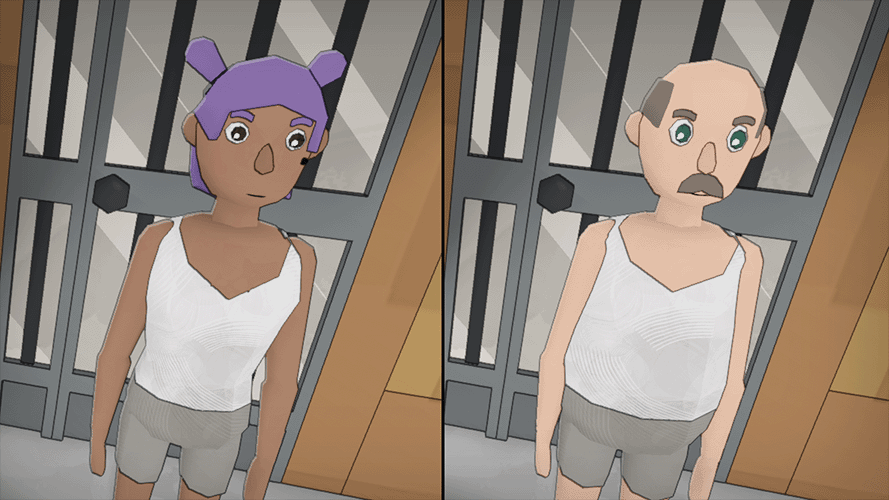
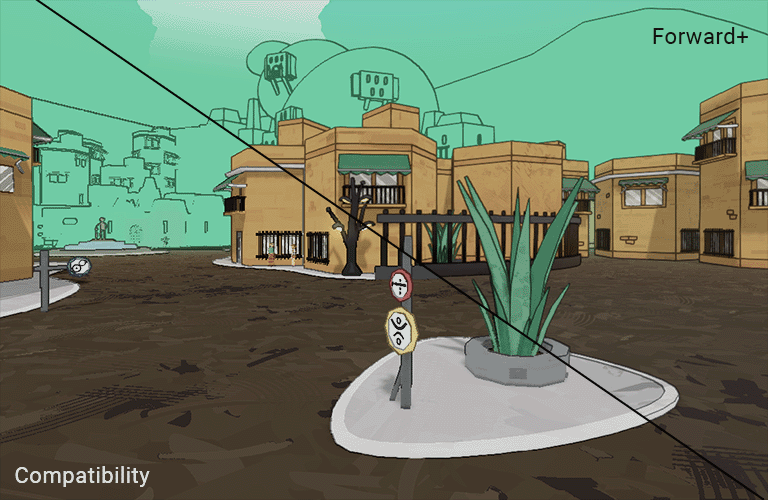
Another thing you should do ahead of time: make sure your game actually runs well! As developers we are often used to working on beefy machines that have no problem running our games, but players (and mostly players of small indie games) very often have older hardware. Something I have struggled a lot with during development of this project is that the default Godot renderer just does not play nice with older PCs and laptops with integrated graphics. More often than not, Vulkan just crashes without any error message, leaving players confused as to why the game doesn't run. I want Imago Season to work on as much hardware as possible, not just because I believe we should try to minimize electronic waste and not force players to buy new expensive cards, but simply because that is where a big slice of the player base already is.
Weeks before releasing the demo, I asked my friends to try the game on their oldest, crappiest laptops. I spent several days working with the Compatibility renderer to make the game look pretty despite the limitations. The result isn't the greatest, as I had to make do without some features that come with the default renderer, but now the game is playable and doesn't look like a complete mess.
The demo is now up and has been doing well. It doesn't have amazing download numbers, but people are finding and enjoying it. I wish I had contacted the press sooner. I waited until I had the demo + trailer ready, but perhaps I should have been sending those emails the week before. This loops back to my thought that I should have done the feature freeze earlier.
Now I'm going back to writing and blockout. Due to spending so many weeks polishing the demo content, I feel like I haven't been advancing with development on the actual game. This is a silly thought, but nevertheless it feels good to be writing new characters now. I can't wait to be able to share more of this little world I'm building. For now, you can explore a slice of it in the demo.
Until next time!